I put it to the test Friday morning at 12:01 am. I held a kickoff meeting for the leadership of the Oracle upgrade project. We set the plan for starting the upgrade process and discussed communication strategy. Project hand-offs were to be explicitly communicated by email. Project work journals were to be handled by a Traction® Teampage status update. My test had begun.
I finally went to bed at 1:30 am. I woke up Saturday morning at 7:15 am. I reached for my iPad so that I could check my email feed before even getting out of bed. I had subscribed to the feed for the project’s workspace the day before. My inbox was full of one-line status updates. It looked like a Twitter feed. I was happy to see that most of the volume came from Traction status reports. I read for 20 minutes before starting the morning status meeting. I had a basic understanding of everything of importance on the project before the meeting started; including all of the problems. More importantly, I knew we were behind schedule.
One of the reasons I use Traction Teampage for project management is that, if used properly, it dramatically reduces the need for project status meetings. I managed the China and Newbury Park’s QAD projects using two 30-minute long meetings per day. This freed team members to focus on working instead of wasting time in meetings. Unfortunately, the acquisition project required hours of meetings per day because the information flow was cumbersome, and my system had failed me. The good news is, for the Oracle upgrade, I am using two meetings per day. One in the morning, and one in the evening.
This is how the 30-minute meeting works.
(1) Start with a review of the open issues.
Team members use status updates to identify issues. We make one issue tracking article per day, which resides in the project management workspace. The title of each issue is listed, along with a link to the task. We create a task for each issue. We track these within the go-live milestone on the Oracle upgrade project. We briefly discuss each issue. The goal is to describe the issue and its impact, and then assign who does what and by when.
(2) A five minute update:
The next step is for the project process owner. the person who has responsibility for executing the next step in the project, to give a five-minute update on the project. This normalizes project status across the team and is essential for team continuity. It also gives the team a better understanding of their comments and work schedule.
(3) New issues:
We ask each team member about potential issues. All issues are welcome, including the minutia of the project. Each issue is described accurately. We assess the potential impact and assign the issue an owner. The owner is responsible for resolving the issue or developing a plan that supports the project timeline.
We record all three steps in Traction so that a wider audience can follow the project. The first step is a static article. The second step represents the latest status posts via Traction’s project management interface. The third step updates a static page with links to tasks from Traction’s project management interface. We tie each issue to the go-live milestone.
Since this is a first attempt at using the status update capability, I’ve had to push my team to use it. It is not mandatory, but it is strongly encouraged. So far, they are exceeding my expectations. I think this is because a status update is easy to do and takes no more effort than tweeting. Plus, the post has no overhead. Team members simply write about accomplishments. It only takes few seconds.
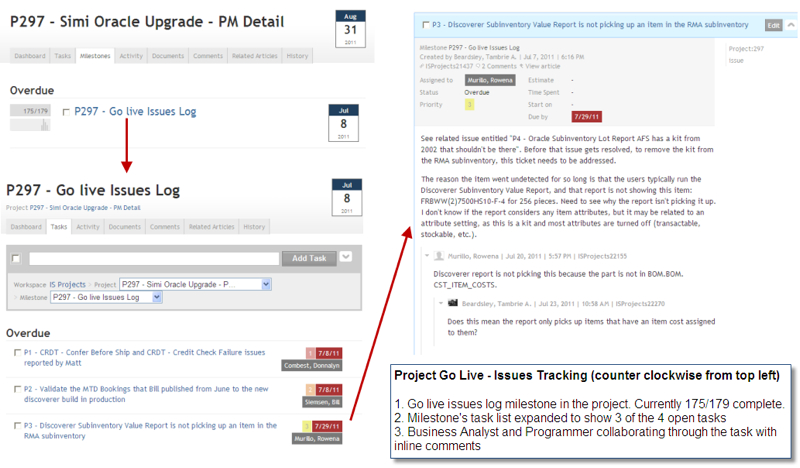
We managed almost 180 issues to closure using the Traction project and task management capabilities. We identified go live issues within a “Go live Issues Log” milestone, and that is visible in the screenshot. As of this screenshot, we closed 175 out of 179 issues identified. The benefit we realized from using Traction here come from everyone on the technical team being on the same page, being able to collaborate through the issue itself rather than in parallel email streams, and being able to communicate clearly to our internal customers about the status of issues encountered. The benefit realized here is that it was a critical success factor in the go live process, and we supplemented issue identification and resolution with the status update (like a Twitter feed) to provide people with project-related information during the 4-day go live process. The project went live successfully and all remaining open issues are being tracked separately as part of our operational processes.
Working in the same platform as our procedures and documentation allows for some interesting things to happen, again, leveraging core hypertext / linking services. For example, we are doing a major system modification project, and one deliverable is to update the documentation for that system. We can associate a task from that project to the procedure in our [TeamPage] documentation wiki. Depending on the context, I see that something needs to be done to that procedure.
- In the project context, I see a task pointing me to the procedure and calling for action.
- In the procedure context, I see a task on the procedure, referencing the project.
- In the user profile context, the assignee will see the task assigned to her, pointing both to the procedure itself and the project that generated the task.
- It’s the same content, the same base URL, referenced in 3 different spaces but all linked together.
What was our goal? We went from request to live in seven months. A team of techs from the US supported a travel team of analysts. We accomplished a task that normally requires at least 2x the time and many more resources. We did it on time and under budget. The stars lined up for us on this project, but our map was in Traction. ~ Enterprise 2.0 and Observable Work: Recap and Speakers Notes
By consolidating this work in an enterprise social software platform, we eliminated 61% of the work required to maintain documentation, do tests, and inefficient waste time spent searching for information across 7 locations. 61% equates to almost two full time resources.
We tried previously to do this consolidation through other tools, to no avail. Why were we successful with Traction? There's something about Traction and social tools like it that enable outcomes that were never before possible. If you read the study, you learn that we experimented with applications of the tool until we found some that worked in solving a real business problem.
We can spend that productivity gain on project work, software changes, user support, and all of those other customer-facing things that our colleagues expect us to do as an IT organization. Individual IT teams that have not consolidated all of their work into our central group are applying these patterns and using the same tools. ~ Social Software for Business Performance - Some Perspective
traction_groundswell_afs_project_go-live_issue-tracking.png
traction-groundswell-afs-p297.png
Fireworks-XSmall.jpg
traction_groundswell_afs_project_go-live_issue-tracking-800w-468h.jpg