While most users contribute with the Add New Article form, Traction offers a variety of methods to publish content:
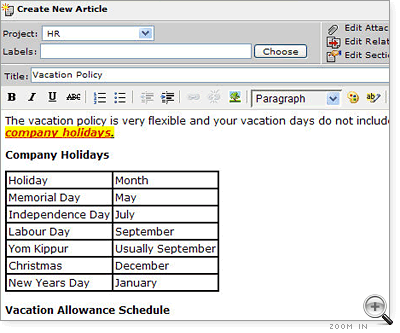
Add New Article Form: Traction's zero foot-print rich text publisher and editor may be launched from any Web browser. Controls include link and image insertion as well as table generation. The same form is used for comments. Rich text controls will appear in Internet Explorer, Firefox, Safari and related browsers.
Traction Instant Publisher: A Microsoft Windows / .NET client for publishing, editing and comments. TIP includes a rich text editor (with controls for bulleted/numbered lists, heading styles, font colors, and bold/italic/underline font styles), drag and drop support from desktop applications, an insert attachment tool, right click publishing from Microsoft Internet Explorer, and a screen capture tool.
Email: Simply send email to any project configured to read a POP3(S) or IMAP(S) mailbox.
Custom Web Forms: In as little as 10 minutes you can customize our template to make single purpose web forms geared for such uses as asking questions, posting a report or issue, sharing intelligence.
Publish RSS Feeds: The Traction TeamPage Feed Reader is licensed as an optional module allowing you to subscribe and authenticate to and then publish content from RSS feeds. It captures title, content, images, attachments, and a source link. Feed Reader can automatically apply tags depending on source or text match rules.
Third party tools and interfaces: See Traction Technology for information about XML-RPC and SOAP interfaces, as well as our Java SDK.
Examples for Add New Article and Email are included in examples below.
Add New Article Form
The Add New Article is a zero footprint, WYSIWYG publishing and editing tool. WYSIWYG rich text controls appear in Microsoft Internet Explorer, Firefox and Safari family browsers. Other browsers can still use the form, without the additional controls.
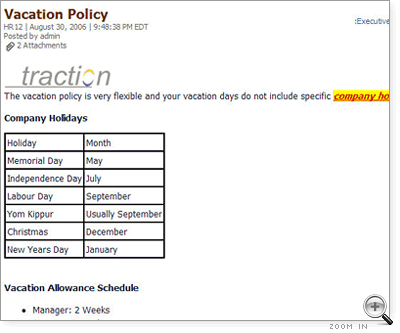
Here is an example article including colored fonts, a table and bulleted lists.
Controls on the form: Besides the expected rich text controls (bold, underline, italic, bulleted and numbered lists) you also find these tools:
Copying Images from your browser: You can copy and paste images from your browser into this form. Rather than simply referencing and displaying the images, Traction will download, attach, and internally reference the image. This applies to sites that are not password protected.
Click submit and the article is published:
Email
Email is a convenient way to publish with the familiar controls in your email program. Users with Author by Email permission may email into spaces which have a POP3(S) or IMAP(S) mailbox configured.
When email is received it is checked to ensure the author has permission, and tags may be applied automatically based on email alias or header rules.
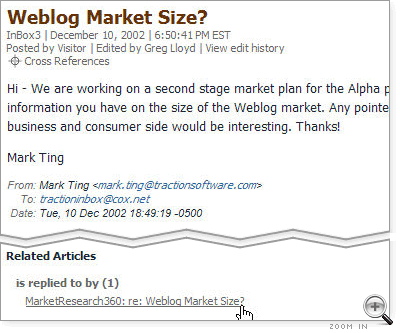
Here is an example of an email sent into a Traction space that allows Visitor to Author by Email. It is from Mark Ting who doesn't have a user account, therefore it is displayed as Posted by Visitor. The email header information is displayed below the article text.